Introduction
When a pipe bursts at 7 a.m. or the AC quits during a July heatwave, nobody browses for long. They search, then they call whoever answers first.
Google's own research backs this up. 50% of consumers who did a local search on their smartphone visited a related store within a day, and 18% of those searches led to a purchase within 24 hours, according to Think with Google's micro-moments research.
That's the exact moment Google Local Services Ads (LSAs) are built to capture. LSAs sit above both organic listings and standard paid ads, claiming the most visible real estate on the search results page for local queries.
This guide covers what LSAs are, how they work, how to set one up, and where a partner like YBM fits in.
Key Takeaways
- LSAs use a pay-per-lead model: you pay for real calls and messages, not clicks
- The Google Verified badge builds instant trust and lifts conversion rates
- Ranking depends on reviews, proximity, responsiveness, and profile completeness
- Going live requires passing Google's screening process for your industry
- Pairing LSAs with review management and SEO produces stronger long-term results
What Are Google Local Services Ads?
Google Local Services Ads are Google's own pay-per-lead advertising platform, built specifically for businesses that perform in-person work, either at a customer's location or at a physical business address. They appear at the very top of relevant local searches, above the map pack and standard text ads.
"Local services" means businesses like plumbers, electricians, HVAC contractors, lawyers, and dentists: anyone who travels to a customer or requires a customer to visit them in person. Unlike Yelp or Angi, LSAs are a first-party Google product. You're not paying a directory for placement; you're paying Google directly for verified leads.
Eligible Industries for LSAs
Google currently supports LSAs across a wide range of categories, including:
- Home services — HVAC, plumbing, electricians, roofing, carpet cleaning, landscaping, pest control
- Legal — personal injury, family law, criminal defense, immigration
- Medical and health — dentists, chiropractors, physical therapists, optometrists
- Real estate services — agents, home inspectors, property managers
- Auto services — repair shops, auto body, towing
- Personal care — hair salons, personal trainers (some limited to select states)
Some categories, like architects or barbershops, are currently restricted to specific states such as California or Florida. Since eligibility shifts regularly, always confirm your category and service area on Google's Local Services eligibility page before assuming you qualify.
LSAs vs. Traditional Google Ads (PPC)
The two products solve different problems and work differently:
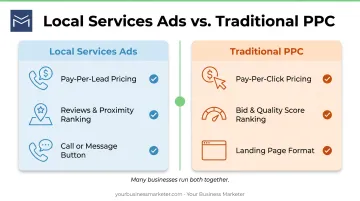
| Factor | LSAs | Traditional PPC |
|---|---|---|
| Pricing | Pay per lead (call, message, booking) | Pay per click |
| Ranking | Reviews, proximity, responsiveness, profile quality | Bid amount + Quality Score |
| Ad format | Call/message button, no landing page needed | Search ad linking to your website |
Many agencies, YBM included, recommend running both simultaneously. LSAs capture ready-to-hire searchers, while PPC campaigns build broader visibility and retarget people still comparing options. Together, they cover more of the search results page than either does alone.
How Do Google Local Services Ads Work?
Local Services Ads place your business at the top of Google Search and Maps when nearby customers look for your services. Billing, ranking, and verification all shape which leads you get and what you pay.
The billing model is straightforward: you're charged only when a customer contacts you through the ad (a phone call, a text message, or a booking request). Cost per lead varies by location, job type, lead type, and your chosen bidding mode. There's no fixed rate across the board, which is why two HVAC contractors in different cities can pay very different amounts for similar leads.
Bid amount alone doesn't decide your rank. According to Google's own ranking guidance, your position is determined by:
- Your bid and the predicted likelihood a search will convert
- How fast you respond to calls and messages
- The searcher's location and the time of their search
- How relevant your listed services and bio are to that search
- Your profile quality: rating, review count, average response time, photos, and completed checks
Not every lead is billable. If a lead turns out to be spam, outside your service area, or unrelated to what you offer, you can dispute it. Google reviews these reports and may issue credits for genuinely invalid leads.
Google Verified Badge Explained
Verification typically involves:
- Identity checks for the business owner and any fieldworkers
- Business registration and license verification
- Proof of general or professional liability insurance, depending on the industry
Once every applicable check clears, Google grants the Google Verified badge.
The legacy Google Guarantee's money-back protection has been phased out. Only services booked before December 7, 2025 remain eligible for that reimbursement, and requests had to be filed within 30 days of service completion, per Google's badge documentation.
Businesses can also run pre-badge ads while final verification is still pending. These generate leads sooner, but they rank below fully verified competitors and aren't available in every category. Garage door services, healthcare, and locksmiths are excluded from this option.
Benefits of Google Local Services Ads
LSAs offer advantages traditional PPC can't match:
- Top-of-page placement: your listing appears above organic results and standard paid ads for local queries
- Instant credibility: the Google Verified badge signals that Google itself has vetted your business, which matters to someone comparing three contractors at once
- Lower-risk spend: you're billed for actual customer contact, not for someone who clicked and bounced
That last point matters most for budget-conscious contractors. A click that never becomes a phone call is wasted money in PPC. In LSAs, that same scenario doesn't generate a charge.
How to Set Up Google Local Services Ads: Step-by-Step
Getting an LSA campaign live takes six steps, from eligibility through ongoing optimization:
- Check your eligibility. Confirm your industry category and service area qualify on Google's Local Services platform. Availability changes by city and state.
- Build your business profile. Add the services you offer, your service area, business hours, and direct contact details.
- Complete Google's screening requirements. Depending on your industry, this may include license verification, insurance documentation, and background checks.
- Set a weekly budget. Choose an amount based on your desired lead volume. You can adjust this at any time as demand shifts.
- Launch, then strengthen your profile. Upload high-quality photos and verify every category is accurate. Thin profiles rank lower than complete ones.
- Monitor your dashboard. Review lead quality and volume regularly, and adjust budget, categories, or service area as needed.
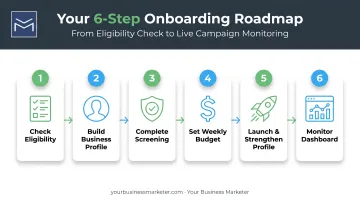
Skipping steps 5 and 6 is the single most common reason businesses see disappointing results after launch. A live ad with an incomplete profile rarely outranks a competitor who filled in every field.
Best Practices & Common Mistakes to Avoid
A few habits separate high-performing LSA accounts from stagnant ones:
- Answer fast. Responsiveness is a tracked ranking factor. A missed call or a message left unanswered overnight can cost you ranking spots.
- Ask for reviews, and respond to them. Rating and review volume carry real weight in the ranking algorithm.
- Keep your profile complete. Accurate service categories, hours, and service area boundaries keep you from losing ground to competitors with fuller profiles.
Common Mistakes That Hurt Performance
- Leaving service categories vague or incomplete
- Ignoring leads or letting reviews go unanswered for weeks
- Setting a weekly budget so low it caps how often your ad even appears
- Never disputing leads that are clearly spam or out-of-area
Each of these is fixable in an afternoon. Most businesses just don't realize they're happening until leads start drying up.
Managing LSAs: DIY vs. Partnering with a Marketing Agency
Running a successful LSA account isn't a "set it and forget it" task. Someone has to watch verification status, monitor budget pacing, dispute bad leads, and keep reviews coming in, on top of the work that made the phone ring.
That's a lot to juggle when you're also out on service calls. So the real choice is whether you run LSAs yourself or hand them to a partner.
DIY can work if you have time each week for the dashboard, dispute junk leads fast, and stay consistent with review requests. It often fits owners with a modest budget and one primary service category.
The cost is time. Hours in Google's interface are hours off estimates, installs, and hiring. Slow disputes mean you pay for bad leads. Weak review follow-up can stall ranking.
An agency partnership shifts that load. The right partner handles verification issues, lead quality, budget pacing, and review generation so you can stay on the tools.
For home services and home improvement contractors, YBM's HIVE program bundles LSA and Google Ads management, SEO, reputation management, and daily optimization under one team. Reporting centers on calls and qualified leads, not impressions alone.
In practice, that usually means:
- One accountable team running LSAs, PPC, and SEO together instead of three separate vendors
- Ongoing review generation that supports LSA ranking
- Daily optimization so budget isn't idle on weak categories
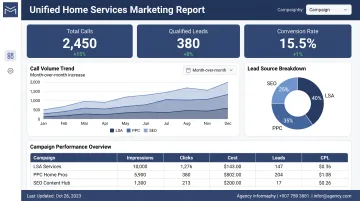
For a Northeast Ohio HVAC contractor or remodeler growing past word-of-mouth, that integrated setup is often what turns ad spend into steady revenue.
Frequently Asked Questions
What does "local services" mean?
Local services are businesses that do in-person work in a defined area, such as home repair, legal services, or medical care. Either the customer travels to the business, or the business travels to them.
What are local services on Google?
Google Local Services Ads are a pay-per-lead platform that connects nearby customers with verified local providers. Ads appear at the top of relevant search results with a call or message button.
Can I use local services without a website?
Yes. A website isn't required to run LSAs. Your ad and Google Business Profile act as the customer-facing presence, so you can generate leads before you build a site.
How much do Google Local Services Ads cost?
Cost varies by industry, location, and local competition. You pay per lead rather than a fixed rate, so two businesses in different markets can see very different pricing.
What's the difference between Google Guaranteed and Google Screened?
Guaranteed applied to home service and trade categories with refund protection for customers. Screened applied to professional services like legal work. Both have since been folded into the single Google Verified badge.
How long does it take to get verified for Google Local Services Ads?
Verification timelines vary by industry and the specific checks required. Google notes it typically takes several weeks after documents are submitted, though simpler categories can move faster.