

That's the problem. Many business owners treat their site like a "set it and forget it" project — build it once, move on, and assume it'll keep working. It won't. This article breaks down what website maintenance actually involves, the business outcomes it drives, and what quietly goes wrong when it's skipped.
Key Takeaways
- Website maintenance protects three things that matter most: security, speed, and conversions
- Neglected sites don't fail all at once — they lose rankings and leads gradually, month over month
- Monthly maintenance costs typically run $20 to $5,000, depending on site size and scope
- Emergency fixes and full rebuilds cost far more than staying ahead of small issues
- Pair maintenance with active SEO oversight to turn upkeep into revenue growth
What Is Website Maintenance (Brief Context)
Website maintenance is the routine work of checking, updating, and fixing a website so it stays secure, fast, and accurate for visitors and search engines.
It covers a specific set of ongoing tasks:
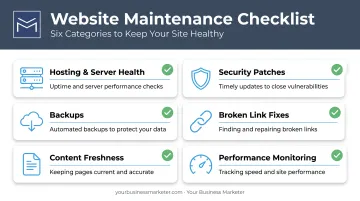
- Hosting and server health so backend infrastructure runs smoothly
- Security patches for CMS software, plugins, themes, and SSL certificates
- Backups so a hack, crash, or bad update doesn't erase everything
- Broken link fixes that stop dead ends for visitors and search crawlers
- Content freshness for pricing, services, and copy that still match reality
- Performance monitoring for load times, uptime, and technical errors
Whether an in-house team or a service provider handles the work, maintenance protects the site's ability to generate leads, sales, and trust. A site that's technically "up" but slow, outdated, or vulnerable isn't doing its job.
Key Advantages of Website Maintenance
The advantages below tie directly to metrics businesses already track: security risk, search visibility, and conversion rate. And each one compounds when maintenance is routine instead of reactive. A site that gets checked monthly stays ahead of problems; a site that only gets attention during a crisis is always playing catch-up.
Stronger Security and Data Protection
Patch vulnerabilities in plugins, themes, CMS software, and SSL certificates before someone else finds them.
Routine security reviews catch the boring stuff that turns into big problems: expired certificates, weak admin logins, outdated software versions. Hackers run automated scans looking for exactly these gaps, and most breaches don't come from sophisticated, novel attacks. They come from known, unpatched vulnerabilities that nobody got around to fixing.
The scale of this risk is significant. IBM's 2026 Cost of a Data Breach Report puts the global average cost of a data breach at $4.99 million, up 12% year over year. That's an organizational benchmark across industries, not a small-business-website figure specifically, but it signals how seriously breaches are treated once they happen.
KPIs impacted:
- Downtime incidents
- Breach or incident rate
- Customer data exposure risk
- Site trust signals (SSL status, browser warnings)
This matters most for sites handling customer data, online payments, or contact forms — and it's non-negotiable for regulated industries like healthcare and finance.
Improved Site Speed, Uptime, and SEO Performance
Monitoring page load speed, fixing broken links, and keeping content and metadata fresh all support stronger search performance. Consistent technical upkeep signals to Google that a site is active and reliable, which supports steadier rankings over time.
Speed isn't a nice-to-have. Google's analysis of 11 million mobile ad landing pages found that increasing load time from 1 second to 10 seconds raised the predicted probability of a mobile visitor bouncing by 123%. Slow or broken pages don't just annoy people. They directly suppress organic rankings and hurt paid ad quality scores.

Here's the part business owners often miss: this isn't only a technical issue. It's a lead generation issue. A faster, well-ranked site converts more of the traffic a business is already paying to attract or already earning organically.
KPIs impacted:
- Page load time
- Bounce rate
- Organic search rankings
- Site uptime percentage
This matters most for businesses relying on local SEO or paid traffic, where every single visitor represents ad spend that's already been paid for.
Better User Experience, Trust, and Conversions
Accurate content, working forms, and current design help visitors trust what they see. Outdated pricing, a broken checkout flow, or a dead contact form quietly turns interested visitors away, often before a sales conversation ever starts.
First impressions form almost instantly. Research from Stanford's Web Credibility project found that visitors judge a site's credibility within seconds. Broken links, unexpected downtime, and rarely updated content rank among the factors most damaging to trust. A stale or malfunctioning site damages credibility before anyone even reads the pitch.
KPIs impacted:
- Conversion rate
- Form completion rate
- Bounce rate
- Repeat visitor rate
This is highest-impact for lead-generation businesses such as home services, medical practices, auto dealerships — where a single missed form submission is a lost customer, not just a metric.
What Happens When Website Maintenance Is Missing or Ignored
Skipping maintenance doesn't cause an obvious crash on day one. It causes slow, compounding decay that's easy to miss until the damage is already done.
Here's what that typically looks like:
- Search rankings erode quietly as inconsistent performance chips away at visibility over months, not days
- Security risk climbs when outdated plugins and expired certificates sit exposed
- Firefighting replaces planning: a scheduled $50 update turns into an emergency fix under pressure
- Full rebuilds replace small updates, and neglected sites rack up a far bigger bill
- Marketing ROI takes the hit because ad spend and SEO work land on a site that can't convert the traffic
That last point is the one most owners underestimate. You can run great ads and rank well organically, but if the site behind those efforts is slow or broken, you're funding traffic that never converts.
How to Get the Most Value from Website Maintenance
Maintenance delivers the most value when it's applied on a consistent schedule (weekly, monthly, or quarterly) rather than in occasional bursts whenever something breaks.
What consistent maintenance looks like in practice:
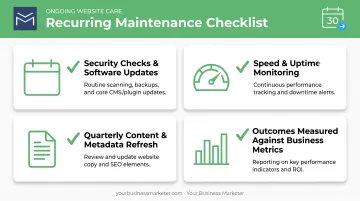
- Security checks and software updates on a recurring cadence
- Speed and uptime monitoring reviewed against actual benchmarks
- Content and metadata refreshed quarterly, not left untouched for years
- Outcomes measured against real business metrics (traffic, leads, rankings), not just "task completed" boxes
That last piece matters more than most maintenance checklists suggest. A completed to-do list means nothing if leads aren't improving.
This is where professional oversight earns its keep. At Your Business Marketer, website updates and optimization aren't treated as an isolated IT task. They're built into ongoing SEO and marketing management, so technical upkeep supports lead generation and revenue goals directly.
That integration keeps the site working toward growth targets every month—not just checked off a maintenance list.
Conclusion
The real value of website maintenance shows up over time: fewer surprises, clearer performance data, and a site that keeps working when you need it.
A well-maintained site keeps generating leads month after month. A neglected one steadily loses ground in rankings, trust, and conversions, often without anyone noticing until the damage shows up in the numbers.
Treat website maintenance as part of your marketing strategy, not a separate technical chore. Done that way, it starts paying for itself instead of quietly costing you.
Frequently Asked Questions
What is website maintenance?
Website maintenance is the ongoing work of monitoring, updating, and securing a site so it stays fast, safe, and accurate. It includes security patches, software updates, content refreshes, backups, and performance checks.
How much does website maintenance cost?
Costs vary widely by site size and complexity, with industry estimates ranging from roughly $20 to $5,000 per month. A simple brochure site costs far less to maintain than a large e-commerce platform with frequent updates.
How can I tell if a website is down for maintenance?
Most sites display a branded maintenance notice explaining the outage and expected return time. Uptime monitoring tools can also confirm whether a site is genuinely down versus experiencing planned, temporary downtime.
How often should website maintenance be performed?
Critical tasks like security checks and software updates should happen weekly or monthly. Deeper reviews of content, design, and overall site health belong on a quarterly or annual schedule.
Can I maintain my website myself, or should I hire a professional?
Simple, low-traffic sites can often be self-managed if you handle updates, backups, and basic content changes consistently. Growing or lead-generation sites usually need professional help to catch security gaps, speed issues, and SEO problems early.
What happens if I don't maintain my website regularly?
Neglect leads to compounding risks: security vulnerabilities, slower performance, declining search rankings, and lost leads or sales over time. Skipped updates and ignored errors often snowball into downtime, lost rankings, and a costly rebuild later.